
For contractors, invoicing is rarely just about sending a bill. It sits at the center of your quote-to-payment experience, your cash flow, customer communication, scheduling, and project visibility. No matter what kind of business you run–be it remodeling, HVAC, plumbing, roofing, electrical services, general home repair, or other–your invoicing process directly affects how quickly you get paid and how efficiently your business operates.
For this reason, the tools you use in your back office administrative tasks matter just as much as the tools you use on the job. Using an invoicing software for contractors as opposed to a generic one can a world of difference in your operations.
Unlike enterprise construction firms managing large-scale commercial contracts, residential contractors and small service businesses deal with a different set of operational realities: shorter project cycles, more frequent customer touchpoints, field-driven work, change orders, urgent service calls, deposits, milestone billing, and a high volume of smaller invoices.
The right invoicing software needs to support how contractors actually work—in trucks, at job sites, inside homes, and often between appointments.
So which features matter most?
1. Mobile-First Invoicing
Contractors are rarely sitting behind a desk. At least, not during typical work hours.
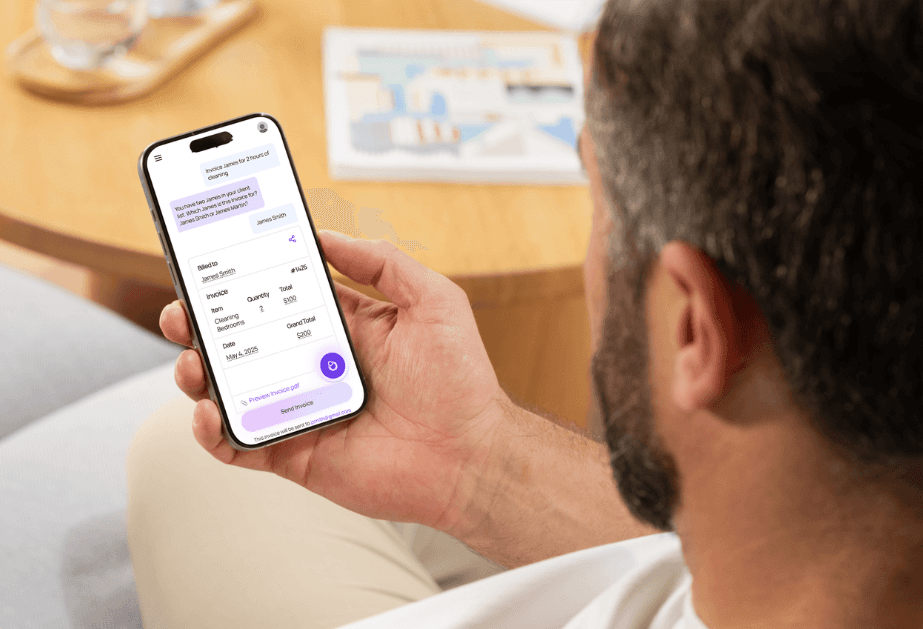
Most estimates, approvals, and invoices happen in the field, with or without the technology needed to do or send them in the moment. Contractors need an invoicing tool that enables these tasks to happen from anywhere, so that they don’t take admin work home with them after a day on-site.
A roofing contractor may need to send an invoice after completing storm repairs. A plumber may need to bill immediately after a service visit. A remodeler may need to invoice based on project milestones while managing multiple homes.
These realities make mobile-first functionality one of the most important features of an invoicing software for contractors.
Strong mobile invoicing tools should allow teams to:
Create and send quotes from a phone or tablet
Create and send invoices from a phone or tablet
Edit labor, materials, and service charges in real time
Capture signatures onsite
Attach photos or job documentation
Track invoice status from the field
If invoicing software feels like desktop software squeezed onto a small screen, field adoption suffers.
More importantly, speed matters for cash flow. The faster an invoice can be sent after work is completed, the shorter the payment cycle often becomes.
2. Progress Billing and Deposit Management
Contracting work often follows milestone-based payments.
Unlike one-time retail transactions, contractors frequently invoice across stages such as:
Initial deposit
Materials payment
Framing completion
Mid-project installment
Final payment
Warranty closeout or adjustments
Without structured billing support, this becomes messy.
Effective invoicing software for contractors should make it easy to:
Collect upfront deposits
Create scheduled payment milestones
Track partial payments
Show outstanding balances
Separate paid vs unpaid project phases
Prevent duplicate billing
This is especially valuable for contractors and service businesses whose work often across weeks or months.
3. Change Order Tracking
Projects change constantly.
A homeowner may ask for upgraded tile. A kitchen renovation may expand into a pantry rebuild. HVAC work may uncover duct issues. Landscaping projects may shift due to drainage concerns.
When change orders are poorly tracked, contractors lose margin.
Modern invoicing software should connect invoice updates to scope changes so teams can:
Add approved extras quickly
Track labor increases
Update materials costs
Record homeowner approvals
Maintain billing accuracy
This reduces underbilling and prevents awkward disputes later.
For contractors, protecting margin often depends on capturing small scope changes consistently.
4. Easy Quote-to-Invoice Conversion
Many contractors waste time rebuilding invoices manually.
A better workflow converts approved estimates directly into invoices.
This matters because residentially-focused businesses often operate on volume. If you are handling dozens of smaller jobs each week, repetitive admin work adds up quickly.
Good invoicing software for contractors should allow:
One-click estimate conversion
Deposit invoicing from estimates
Split invoicing across milestones
Automatic tax calculations
Updated pricing adjustments
Customer approval visibility
Reducing duplicate data entry lowers errors and speeds billing.
5. Customer-Friendly Payment Experience
Residential and general contractors often invoice homeowners, not procurement teams. This means the payment experience must feel simple and trustworthy.
If paying an invoice is confusing, customers delay.
Strong invoicing tools should support:
Card payments
ACH or bank transfers
Mobile-friendly payment links
Clear invoice breakdowns
Automatic receipts
Payment reminders
Installment visibility
For homeowners, transparency improves trust. For contractors, easier payment collection improves cash flow.
6. Job Costing Visibility
Many small contractors know revenue. Fewer know true profitability.
An invoice might show a $12,000 kitchen remodel, but if labor overruns, materials spikes, or subcontractor costs are poorly tracked, margin can disappear.
The best invoicing software for contractors should clearly connect billing to job costing data like:
Labor costs
Material spend
Equipment use
Subcontractor expenses
Profit margin
Estimated vs actual costs
Because contractors often run lean businesses, visibility into margin by project can influence pricing decisions and staffing plans.
7. Offline Access for Field Teams
Not every home site has reliable internet, especially sites like:
New subdivisions
Rural properties
Basements
Remote utility areas
Exterior sites with weak coverage
If invoicing stops when signal drops, productivity drops too.
Offline-first capabilities allow teams to:
Create invoices
Update job records
Capture signatures
Store photos
Sync later
This matters especially for service contractors and repair crews moving across multiple locations daily.
8. Voice-Powered Workflow Support
This feature is becoming increasingly relevant.
Many residential and general contractors’ work is on-the-go. That might mean moving from one job site to another. Or it might mean working with gloves on, carrying tools, or navigating a tight crawlspace. In these kinds of scenarios, typing long invoice notes is inefficient.
Voice-powered invoicing workflows can help teams:
Dictate line items
Add job notes
Log materials
Record customer instructions
Capture follow-up reminders
Create documentation faster
For field-first businesses, voice functionality can reduce friction significantly.
When combined with AI-enabled tools, you can execute tasks like invoice creation from start to finish with nothing but your voice.
As construction software evolves, hands-free input may become one of the more practical productivity features—not because it feels advanced, but because it matches real field behavior.
9. Automated Reminders and Faster Collections
Late payments are a major issue for any small business, but especially so for contractors working on tight margins.
Customers may delay payment for any reason or no reason at all, simply because they forget. Automation reduces follow-up friction significantly.
Key features include:
Due-date reminders
Past-due notifications
Recurring invoices
Deposit reminders
Final payment alerts
Payment confirmation messages
This helps smaller contractors avoid spending valuable time chasing invoices or navigating awkward conversations with customers.
10. Documentation and Audit Trails
Disputes happen. A homeowner may question any step of the project from scope to final invoice.
Strong invoicing systems should preserve records such as:
Invoice edits
Payment history
Approval timestamps
Signed agreements
Notes
Attached photos
Communication logs
For contractors, documentation can protect revenue and reputation.
What Matters Most in Practice?
If you strip away flashy features, contractors typically need invoicing software that does three things exceptionally well:
1. Help teams invoice from the field
Because contracting work is mobile.
2. Reduce admin friction
Because smaller businesses often operate without large back-office teams.
3. Speed up payment collection
Because cash flow drives hiring, materials purchasing, and growth.
At the end of the day, everything else should support these main features.
Final Thoughts
The best invoicing software for contractors should fit the realities of contracting work: field mobility, quick turnaround jobs, homeowner communication, milestone billing, and margin protection.
For roofers, remodelers, electricians, plumbers, landscapers, HVAC providers, painters, and general home service businesses, software should not feel like accounting infrastructure built for office teams. It should feel like an operational tool designed around how contractors actually move through a workday.
That is why mobile-first design, offline access, simple payments, and increasingly voice-powered workflows are becoming more important.
Platforms like Invoyce reflect this broader shift toward contractor invoicing software built around speed, field usability, and lower admin friction. But regardless of provider, the right decision comes down to whether the software helps contractors invoice faster, protect margins, and get paid with less effort.

More Operations